
SNMP Monitoring by NetFlow Logic
Full SNMP visibility across your entire
network — without the manual work
Most SNMP tools require you to manually enter every device,
map OIDs by vendor, and repeat the process every time your network changes.
NFO does all of it for you — automatically and continuously.
3K
SNMP devices / instance
0
Manual OID mappings
required
v2c/v3
SNMP protocol
support
<1hr
From install to
live device data
How It Works
What goes in. What NFO does with it. Where it goes.
SNMP Monitoring is a fully integrated subsystem of NFO — not a separate agent.
Device discovery, classification, polling, and output share the same pipeline.
Configure once, monitor everything.
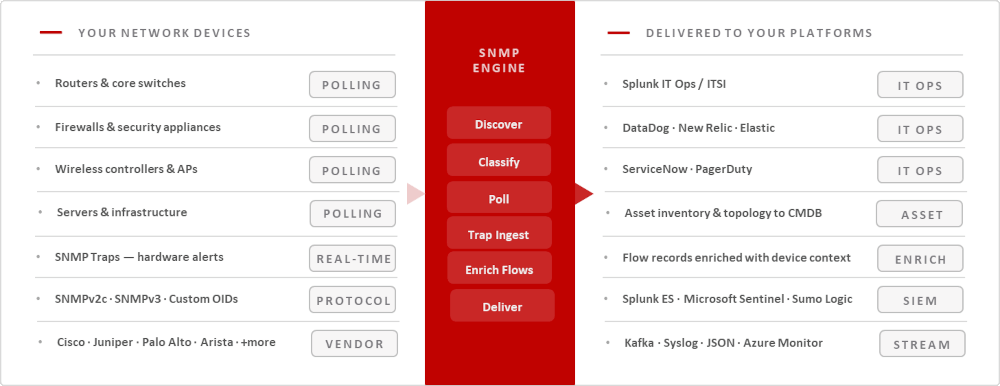
Zero-Touch Discovery Engine
From IP range to monitored inventory in four steps
Introduced in NFO 2.12.0. No spreadsheets, no OID mapping sessions, no vendor-by-vendor configuration. Define your network once — NFO handles everything that comes after.
01
Configure credentials once
Add your SNMPv2c community strings or SNMPv3 credentials. NFO stores them securely and applies them automatically during discovery — no per-device credential assignment needed.
02
Define your IP ranges
Enter subnets or IP ranges (e.g., 10.0.0.0/24). Use Dry Run to preview exactly which devices NFO will discover and how it will classify them — before anything is committed to inventory.
03
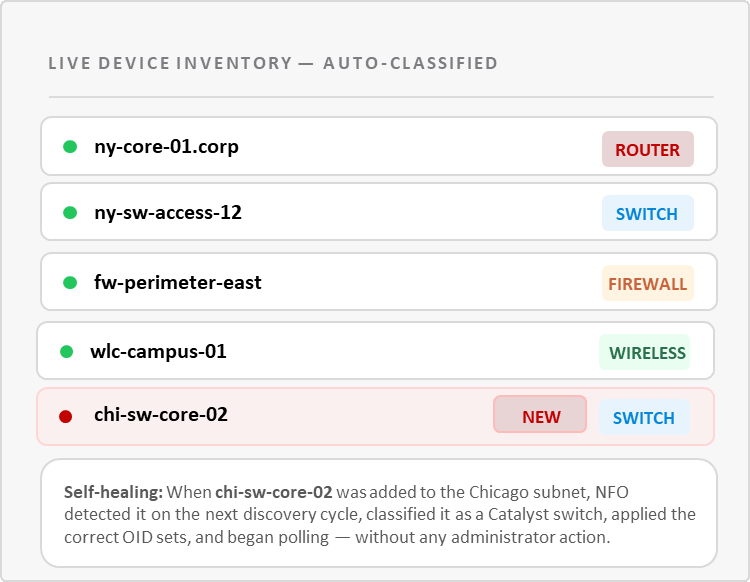
NFO classifies automatically
NFO analyzes each device’s sysObjectID, sysDescription, and Private Enterprise Numbers to assign the correct Device Type (router, switch, firewall, wireless) and Device Groups (Cisco Catalyst, StackWise, VPN Gateway). No manual OID mapping required.
04
Polling starts — and stays current
NFO begins polling CPU, memory, interfaces, and custom KPIs immediately, applying the right OID sets for each device class. Discovery reruns on a schedule (default: twice daily). New devices are onboarded automatically. Hardware changes are detected and reclassified without intervention.
CAPABILITY 01
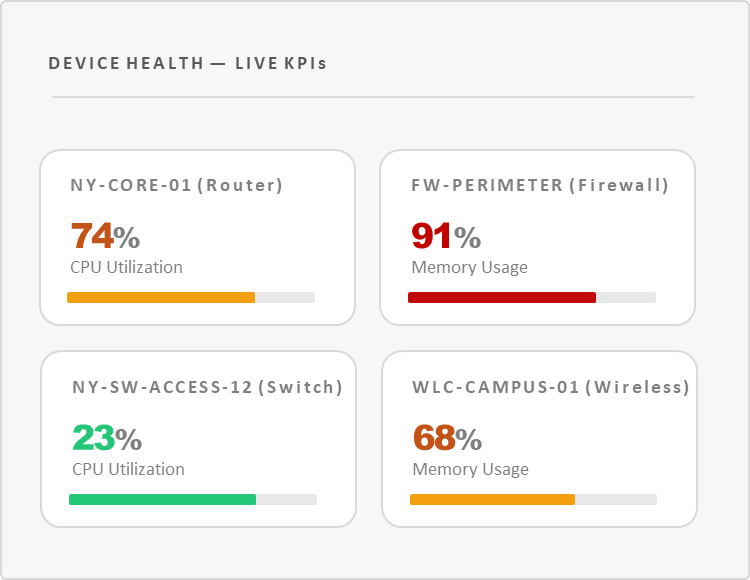
Complete device health visibility — CPU, memory, interfaces, and beyond.
NFO polls the metrics that matter for every device class. A router gets interface counters and BGP state. A firewall gets session tables and CPU load. The right data, from the right OIDs, applied automatically based on Device Type.

Real-time KPIs
CPU utilization, memory usage, disk, interface throughput, error rates, and custom metrics — updated on every polling cycle.

In-depth interface monitoring
Bandwidth consumption, error rates, utilization percentages, and status changes per interface — with vendor-accurate interface names.

Custom OID sets
Monitor any proprietary metric from any vendor. Upload your MIBs, define your OID set, link it to a Device Group — NFO handles the rest.

Historical trending
All polling data forwarded to your SIEM or data platform for capacity planning, trend analysis, and long-term reporting.

CAPABILITY 02
One device, multiple groups.
The right OIDs, applied automatically
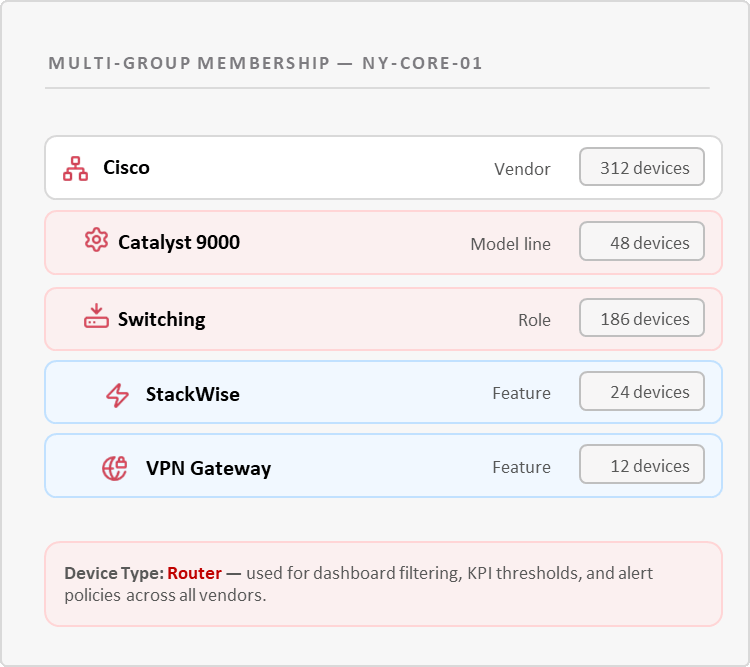
Traditional monitoring puts every device in one folder. NFO uses Multi-Group Membership: each device simultaneously inherits from Vendor, Role, and Feature groups — giving you both surgical OID accuracy and operational reporting flexibility.

Device Type — for operations
A single primary type (router, switch, firewall, wireless) anchors every device in dashboards, alerts, and KPI views. Filter your entire Splunk dashboard to “all firewalls” in one click.

Device Groups — for intelligence
A Cisco Catalyst 9000 simultaneously belongs to Cisco, Catalyst 9000, Switching, and StackWise groups — inheriting the correct MIBs and OID sets from each.

Classification Rules
Need a Linux server classified as a Security Appliance? Define a rule: match on sysName pattern, assign Device Type. Rules apply on the next discovery cycle.

CAPABILITY 03
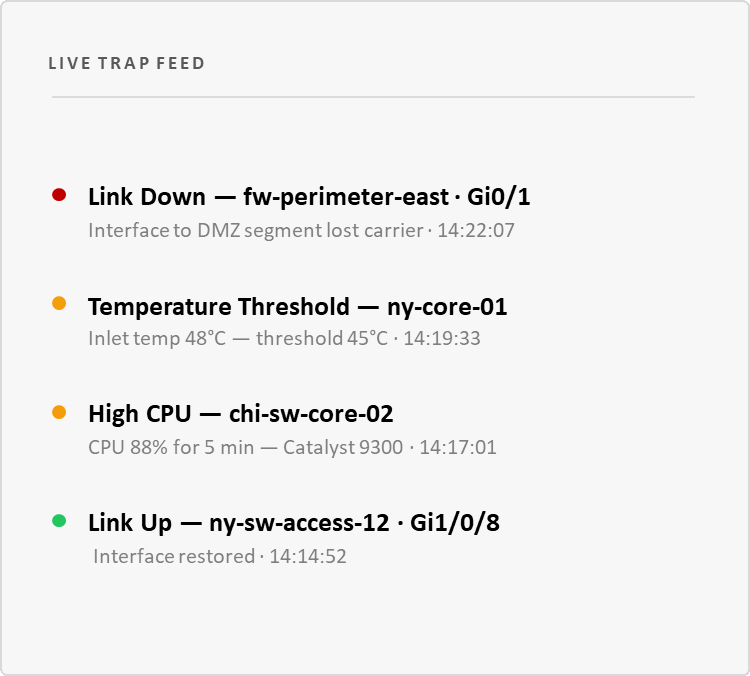
SNMP Traps — real-time alerts
from your devices, as they happen
Polling tells you the state of your network every N seconds. Traps tell you the moment something changes. NFO receives trap notifications directly from your devices and forwards them immediately to your SIEM — normalized and enriched.

Instant event notification
Link down, device unreachable, fan failure, temperature threshold — received and forwarded within seconds of the event occurring on the device.

SNMPv3 trap support
Full encrypted SNMPv3 trap handling with automatic Engine ID extraction — no pre-registration required per device. (SNMP Pro
license)

Normalized and enriched output
Trap varbinds are normalized into consistent output fields and enriched with device context — Device Type, Device Group, location — before delivery.

CAPABILITY 04
Every flow record, automatically enriched with device context
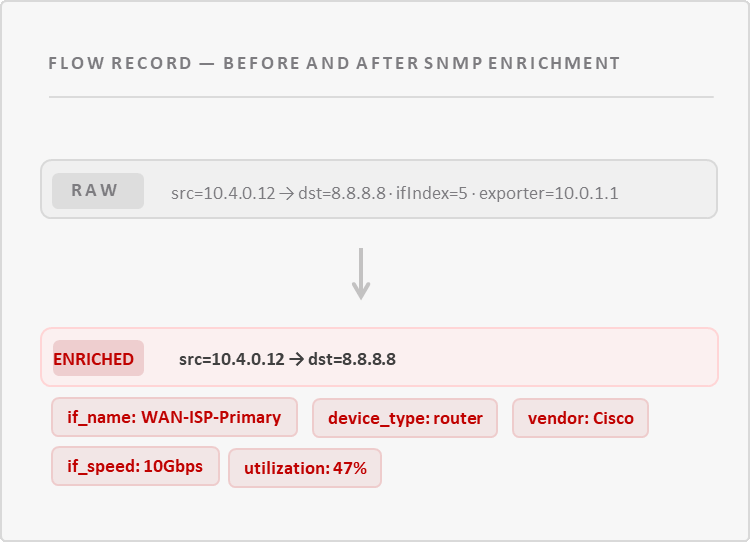
Device inventory built during Auto-discovery doesn’t just sit in a dashboard. NFO’s Module 10103 joins SNMP device and interface data to flow records in real time — so every flow event arriving at your SIEM carries device context it wouldn’t otherwise have.
Interface name resolution
Flow records reference interface by index. NFO resolves that to a human-readable name (e.g., “WAN-ISP-Primary”) and adds it to every matching flow event.
Device context on every event
Device Type, vendor, model, and location fields added to flow records — enabling device-aware search and correlation in Splunk or any SIEM.
Bandwidth utilization in context
Interface speed from SNMP combined with flow volume gives you true utilization percentage — not just raw bytes — per interface, per device.

Licensing
SNMP Basic and SNMP Pro
SNMP Basic gives you device health visibility alongside your
NetFlow data — no additional license required. SNMP Pro unlocks
Zero-Touch Discovery, SNMPv3, and full automation for
enterprise-scale environments.
SNMP Basic — included with NFO
Foundational SNMP Monitoring
Get device health visibility up and running alongside your NetFlow data — no additional license needed. A solid starting point for smaller environments or teams new to infrastructure monitoring.
SNMP Pro — separate license
Enterprise-Scale Automation
Zero-Touch Discovery, SNMPv3 encryption, multi-group inheritance, and custom OID sets. Built for large networks where manual configuration is not an option.
Part of the NFO Platform
SNMP Monitoring runs inside NFO —
not alongside it
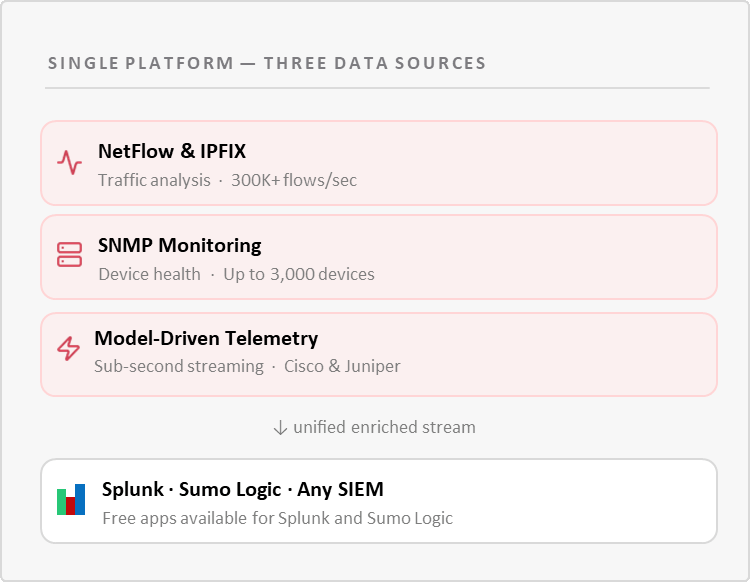
No separate agent to install. No second UI to learn. No additional infrastructure to maintain. SNMP Monitoring is an integrated subsystem of NetFlow Optimizer — device discovery, flow enrichment, and SNMP polling share the same pipeline. Configuration, credentials, and output settings are all managed in one place.
This also means your SNMP device inventory directly improves flow data quality. The better NFO classifies your devices, the richer the context it adds to every NetFlow record before it reaches your SIEM.
Performance & Scale
Built for enterprise networks
3K
Devices / instance · SNMP PRO
Device Scale
Poll up to 3,000 network devices per NFO instance. Scale beyond that with additional instances in a distributed setup — no throughput ceiling.
<1hr
From install to live device data
Time to Value
Define IP ranges, run Auto-discovery, enable polling. Most environments are fully operational — devices discovered, classified, and reporting — in under an hour.
2x
Daily · Default discovery schedule
Self-Healing Inventory
Auto-discovery reruns on a configurable schedule. New devices are onboarded, firmware changes are detected, and classifications are updated — automatically.
RESOURCES
Go deeper
REFERENCE
DEEP DIVE
See your devices discovered and
monitored — in under an hour.
Start with your own network data, or talk to an engineer who
knows SNMP. Either way, no pressure.