
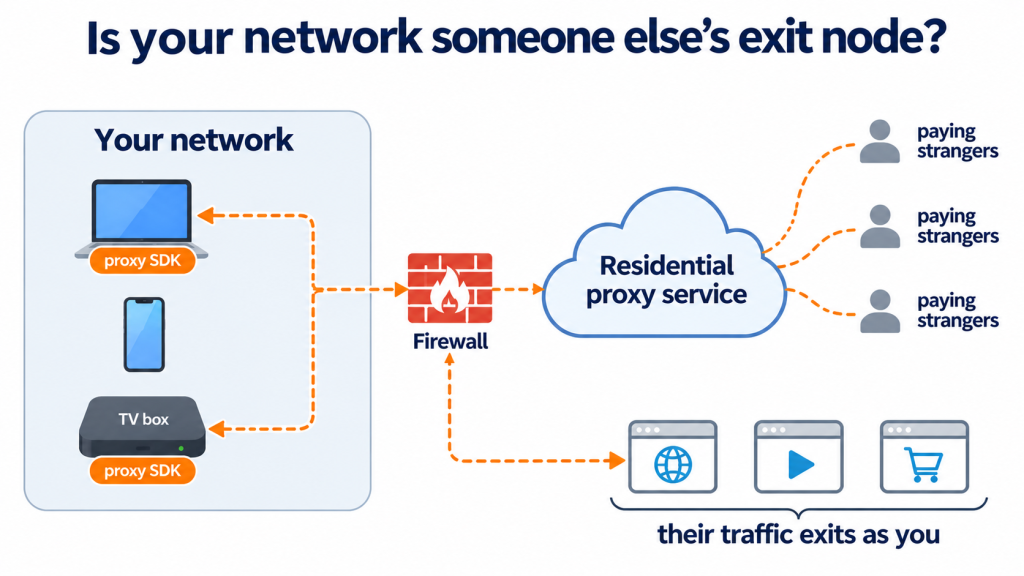
On November 4, the security firm Layer3 Intel reported that residential proxy traffic had been exiting through the network of the Executive Office of the President. Between October 5 and November 3, its probes exited through that network 236 times, from six addresses, on 26 of the 30 days. Layer3 found 28 separate residential proxy services able to route traffic through it, most of the activity fell between 5 p.m. and midnight, and the access was public: anyone could buy it for a few dollars.
Layer3 did not go looking for the White House. It found the exits by chance while requesting rotating access from public proxy services. As KrebsOnSecurity reported, the proxy tracking firm Synthient tied the activity to installations of Infatica, a proxy SDK often bundled into free mobile and desktop applications.
The address is what made headlines. The lesson is that Layer3 discovered this from the outside, by renting the proxy. The organization that owns the network should be able to find it from the inside first.
Not a White House Problem
Residential proxy services rent out ordinary internet connections so that their customers’ traffic appears to come from someone else’s address. App developers embed proxy SDKs to monetize free software, earning a small payment per installation. The person who installed the app often has no idea their device is now relaying strangers’ traffic.
These devices turn up on networks that matter. Krebs cites the proxy tracking service Spur finding residential proxies in nearly 300 government networks, 318 utility companies, 166 healthcare organizations, and 141 banking and finance companies, and Infoblox reporting that 65 percent of its customers were querying residential proxy domains. And it is not only apps. Two days before the White House report, Google described taking down the XCPE botnet, more than 1.3 million Android TV boxes that shipped with malware renting their owners’ connections to proxy services. The same malware appeared in telehealth devices and digital signage, the kind of unmanaged devices that will never run a security agent.
Why It Matters: A Rented Door into Your Network
The obvious risk is reputation. Residential proxies carry account takeover attempts, ad fraud, and mass scraping, and when that traffic exits through your addresses, it looks like it came from you.
The less obvious risk is worse. A proxied device sits inside your network and relays traffic on behalf of people you do not know. In January 2026, Synthient showed how criminals were abusing a flaw in residential proxy services to reach and compromise other devices on the local networks behind proxy endpoints. Layer3 raised the same concern about the White House: a similar flaw in an SDK there could let anyone buying proxy access reach internal systems.
Layer3 found the proxy from the outside by renting it. Every network owner should be able to find it from the inside first.
What a Proxied Device Looks Like on the Network
A proxy SDK is software doing network work, and network work leaves flow records. A device relaying traffic for paying strangers typically maintains connections to the proxy provider’s infrastructure and makes outbound connections to destinations that have nothing to do with its user. Those patterns are visible in flow from the routers, firewalls, and switches the traffic already crosses, including for devices where no agent is installed.
| Signal (investigated in Splunk) | What enriched flow shows |
| Persistent connections to proxy infrastructure | Long-lived or recurring sessions from one internal host to the same external service, with destination ASN and threat intelligence context where feeds list known proxy infrastructure |
| Fan-out to unrelated destinations | One internal host reaching an unusually large number of distinct external destinations and networks that have nothing to do with its role or its user |
| Activity out of character | Outbound connections and data volumes at hours or levels that do not match the host’s normal pattern, such as a workstation busy every evening |
| Probing inside the network | Connections from that host to internal systems it does not normally contact, the path a proxy flaw would give an outsider |
| Whose device it is | User identity where a mapping exists, so the investigation reaches a person and an app, not just an IP address |
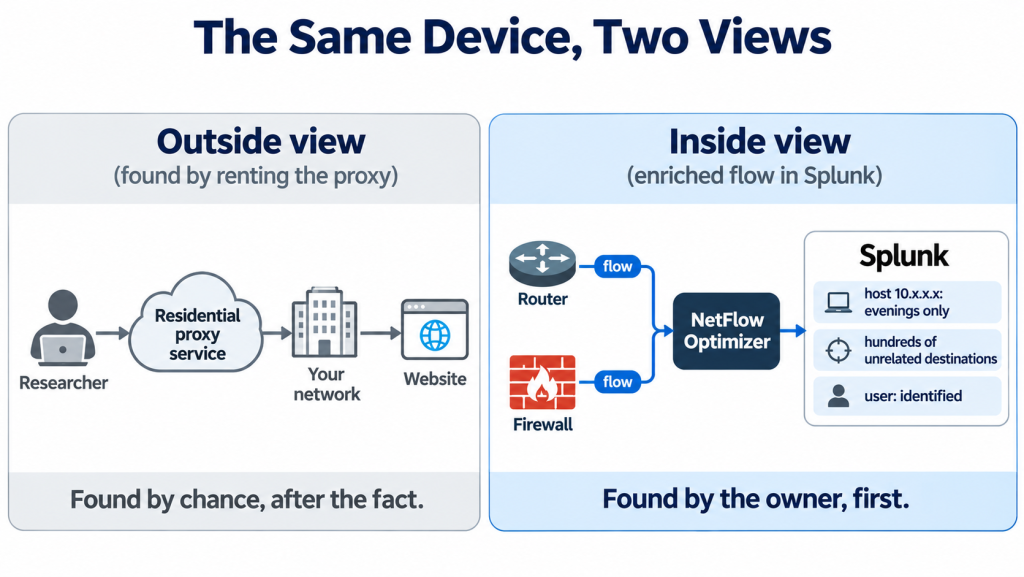
No single signal proves a device is a proxy. Together, they give a hunter a short list of hosts worth a closer look, and an endpoint team a specific device and app to examine.
Inside Evidence, in Context
NetFlow Optimizer (NFO) collects flow from multi-vendor routers, switches, and firewalls, enriches each record with user identity where a mapping exists, application, threat intelligence, and GeoIP/ASN context, and reduces volume by 80 to 90 percent, primarily through aggregation. It delivers the result, CIM-compliant, to Splunk, where hunters can look for the patterns above across weeks of history. A device that relays traffic only in the evenings, as Layer3 observed, shows up as a pattern over time, not in a single snapshot.
Flow works alongside other evidence. DNS monitoring shows which proxy domains a device resolves. Endpoint and mobile device management tools show which app carried the SDK. Flow shows what the device did on the network, how much, when, and with whom, including for devices those other tools cannot see.
As always, NFO does not detect, alert, or decide that a device is a proxy. It collects, enriches, reduces, and delivers. The investigation and the response happen in Splunk and with the teams who own the device.
The Bottom Line
Residential proxy SDKs turn ordinary devices into rented exit points, and they appear on government, utility, healthcare, and financial networks. The White House case was found from the outside, by a researcher who paid for access. Every organization should be able to find the same thing from the inside first. NFO gives Splunk the enriched network evidence to do it: which internal hosts are relaying traffic, where it goes, when, and whose device it is.
Find the rented door before someone else walks through it.
Want to know whether any device on your network is relaying traffic for strangers? Start a free 60-day trial of NetFlow Optimizer or schedule a technical demo with a NetFlow Logic engineer.
Start Free Trial | Schedule a Demo | Government Solutions | NFO Documentation